Test report · 2026-09-24 · RTX 5080
A ComfyUI update made
MiniMax H3 video generation about 13 seconds faster
Making one ~5-second clip now takes 43.0 s instead of 56.4 s. Most of the gain is in the “finishing” step that turns the AI's compressed output back into real video. By the numbers, image quality is essentially unchanged.
Four terms first
- Frames and seconds
- Video is 24 pictures per second. 124 frames ≈ 5.2 s, 243 frames ≈ 10.1 s. This page gives seconds first.
- Sampling
- The step where the AI “thinks up” the video. It takes the largest share of generation time.
- VAE (finishing)
- What the AI produces is a compressed bundle of numbers. The VAE turns it back into real video — like developing a photo.
- Seed
- The starting number for the AI's randomness. Same seed and settings give the same video, so old and new can be compared fairly.
What was compared
Every generation setting was kept the same; only the ComfyUI side was swapped.
- ComfyUI 0.35.0
- VAE: original weights (FP16)
- No speed flag
- ComfyUI 0.36.0
- VAE: lighter weights (INT8)
- Speed flag
--fast fp16_accumulation
Shared conditions
- RTX 5080 (16 GB)
- 1152×640
- ≈5.2 s (124 frames, 24 fps)
- MiniMax H3
- Turbo LoRA, 4 steps
- Sparse attention 10% (ComfyUI built-in node)
- Same 3 seeds
Three things changed together, so not all of the time saved can be credited to the VAE. The VAE alone is measured separately under “Longer and higher-resolution video”.
Where the time went
Breakdown of the middle run of three (seed 5214 for both). Sampling shrank a little (36.3 → 33.2 s); finishing (VAE) shrank a lot (16.6 → 6.0 s).
Same pattern in all three runs
One clip per version per seed, three pairs. Every pair saved more than 10 seconds.
The resulting videos
Old and new clips made with the same seed, 5228.
Longer and higher-resolution video
For a ~10-second clip, finishing (VAE) alone went from 28.5 s to 10.0 s. The longer and sharper the video, the more seconds are saved.
This is not whole generation: an already finished video was passed through the VAE only. Middle value of 3 runs each. Adding “new ComfyUI with the original weights” in between separates how much the update and the lighter weights each contribute.
About 1.7× from the ComfyUI update, another 1.7× from the lighter weights. About 2.8× combined.
About 1.7× from the ComfyUI update, another 1.7× from the lighter weights. About 2.9× combined.
About 1.7× from the ComfyUI update, another 1.7× from the lighter weights. About 2.9× combined.
Table including encoding (shrinking video for the AI)
| Video | Setup | Encode | Decode (finishing) | Total |
|---|---|---|---|---|
| ≈5.2 s · 1152×640124 frames | Old (0.35, original weights) | 21.6 s | 14.2 s | 35.8 s |
| New (0.36, original weights) | 9.0 s | 8.5 s | 17.5 s | |
| New (0.36, lighter weights) | 9.0 s | 5.0 s | 14.1 s | |
| ≈10.1 s · 1152×640243 frames | Old (0.35, original weights) | 40.3 s | 28.5 s | 68.7 s |
| New (0.36, original weights) | 16.6 s | 17.0 s | 33.6 s | |
| New (0.36, lighter weights) | 16.7 s | 10.0 s | 26.7 s | |
| ≈10.1 s · 1408×800 (high-res)243 frames | Old (0.35, original weights) | 62.7 s | 44.2 s | 106.9 s |
| New (0.36, original weights) | 25.9 s | 26.3 s | 52.2 s | |
| New (0.36, lighter weights) | 25.9 s | 15.5 s | 41.4 s |
Ordinary video generation only uses decoding. Encoding is used when an existing video is loaded and edited.
Did image quality change?
The same video was passed through the VAE with the original and the lighter weights. Side by side, there is almost no visible difference.
| Video | Avg. difference | PSNR | SSIM | Difference from source original / lighter |
|---|---|---|---|---|
| ≈5.2 s · 1152×640 | 1.3 / 255 | 42.7 dB | 0.988 | 35.88 / 35.85 dB |
| ≈10.1 s · 1152×640 | 1.2 / 255 | 43.0 dB | 0.987 | 36.74 / 36.74 dB |
| ≈10.1 s · 1408×800 (high-res) | 1.3 / 255 | 42.1 dB | 0.983 | 35.40 / 35.39 dB |
- Avg. difference
- How many of the 256 brightness levels each pixel is off, on average.
- PSNR
- Higher is closer. Above 40 dB is generally considered hard to tell apart side by side.
- SSIM
- Similarity of shapes and texture. 1 means identical.
- Difference from source
- PSNR against the video before it went in. Both weights drift by the same amount; the lighter one does not degrade it further.
Figures compare the saved videos (WebM), so they include differences from compression when saving.
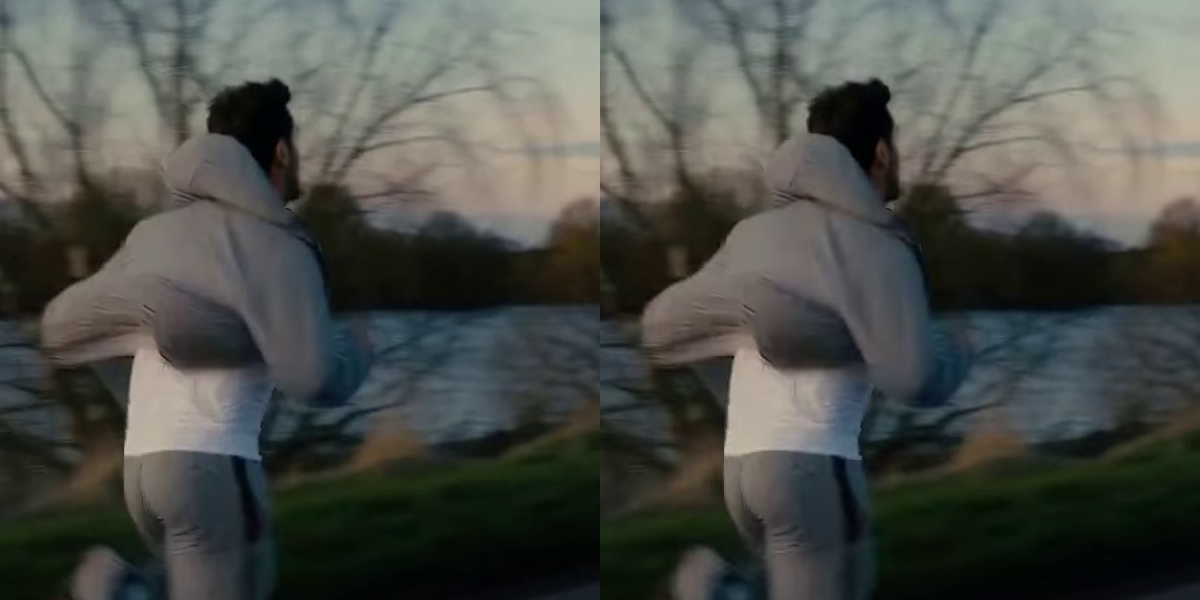
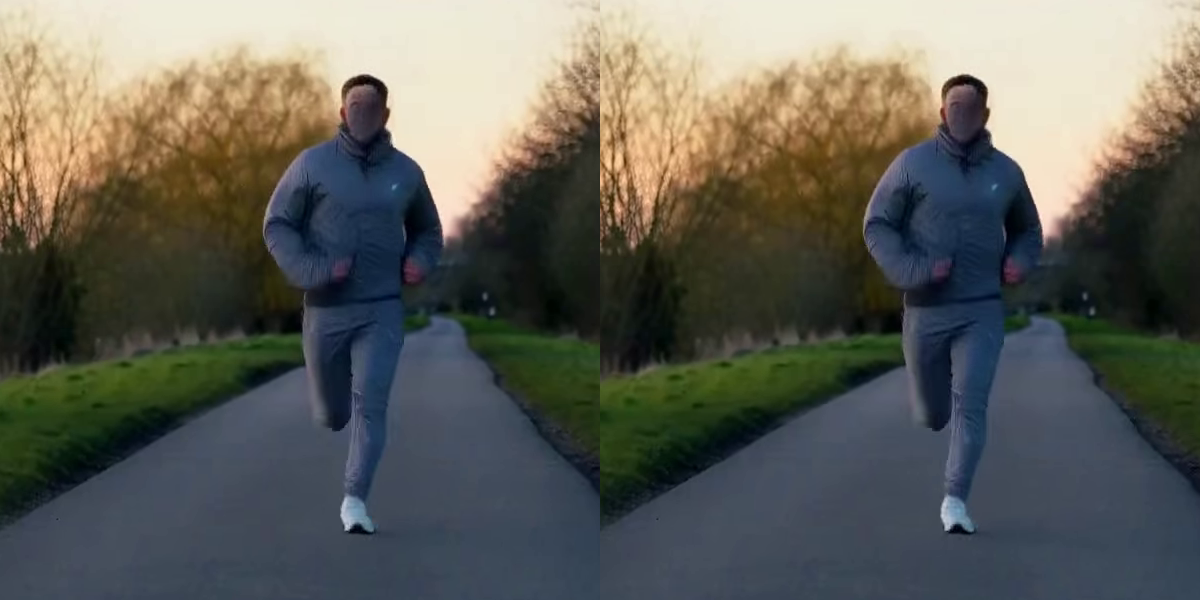
The single most different frame, at full size
Across all frames, the one where left and right differed most. Left: original weights. Right: lighter weights.
For reference: with no speed-ups at all
An earlier exploration also made clips with plain MiniMax H3 (20 steps), with neither turbo LoRA nor sparse attention. One run each, reference only. The sparse attention there was a test node at a uniform 5% (no Jev allocation).
| Video | Plain H3 (20 steps) | Turbo LoRA + sparse 5% |
|---|---|---|
| ≈5.2 s · 1152×640 | 5 min 36 s | 95.9 s*First run of the session, so it includes model loading |
| ≈10.1 s · 1152×640 | 16 min 22 s | 82.7 s |
| ≈10.1 s · 1408×800 (high-res) | 44 min 01 s | 2 min 12 s |
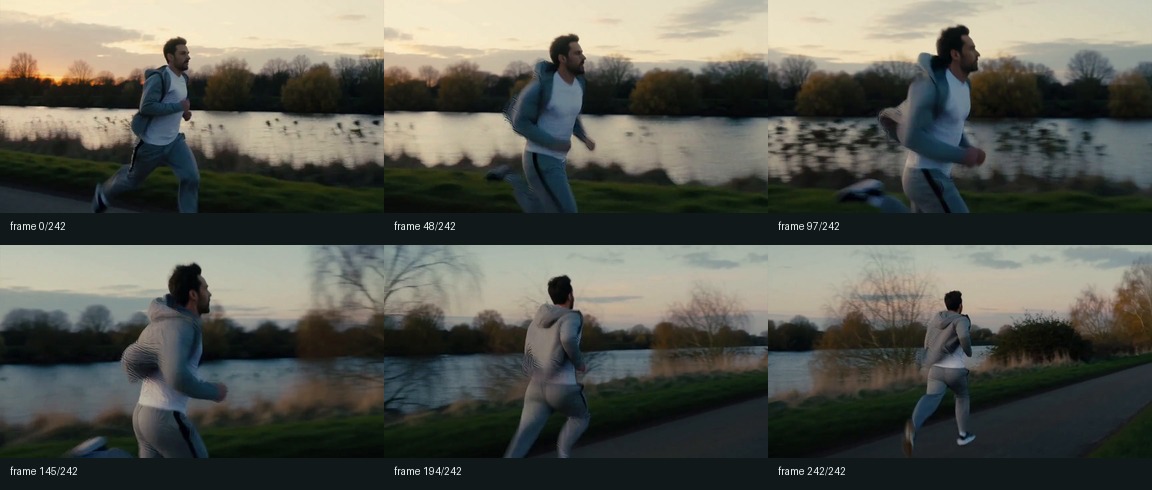
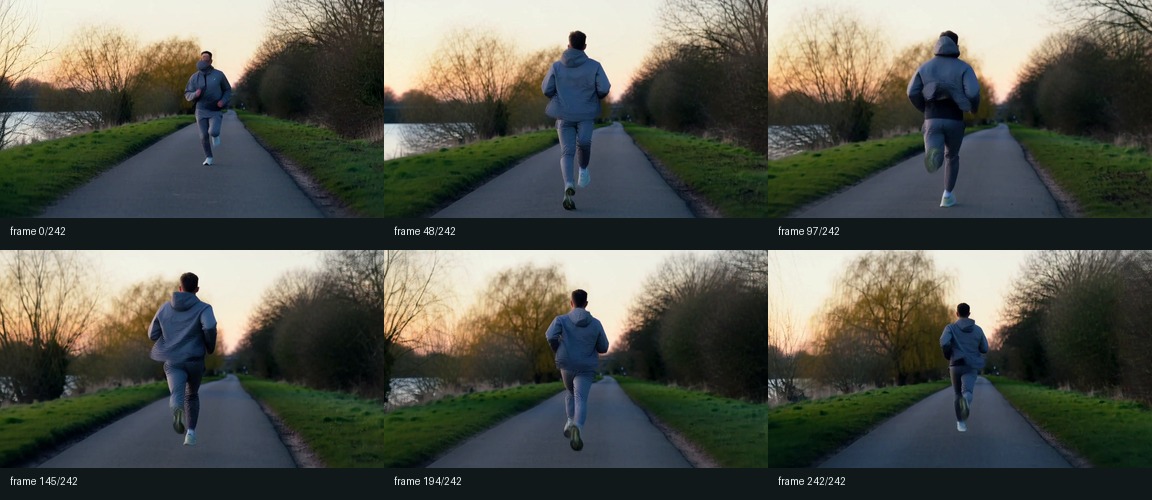
Six frames at 0, 2, 4, 6, 8 and 10 s from a ~10-second clip (turbo LoRA + sparse)
How this was measured
- Time runs from when ComfyUI starts processing until the MP4 is saved. Queue waiting is not included.
- For each version the first clip includes model loading and is not counted. After that, one clip per seed (5214, 5221, 5228); the middle value is used.
- The old and new ComfyUI were never running at the same time; they were used one after the other.
- The first measurement pass showed large delays on the old version (558.6 s, 245.3 s). The cause was not identified. The values used here come from a re-run after a restart; all 16 runs, including the first pass, are kept in the data.
- The previous page's best of 54.4 s was measured with 5% sparse attention on a different day. Conditions differ from today's best of 42.2 s, so the two are not compared.
A prompt for your AI agent
For anyone who wants to try this speed-up on their own PC. Paste the text below as-is into an AI agent such as Claude Code or Codex. It works from finding out how ComfyUI is installed through to re-measuring and comparing. It asks for your OK before updating, downloading or changing settings.
It has only been verified on an RTX 5080 (16 GB). Results from other setups would be very welcome.
ComfyUI can also be run on a cloud service that rents out GPUs by the hour (often called GPU rental). I have not tried this myself, but if you do not have a high-spec PC, it may be worth considering as an option.
Please speed up MiniMax H3 video generation in ComfyUI.
There are three steps. All of them use official ComfyUI features and an officially distributed model; no custom nodes are needed.

  1. Update ComfyUI to 0.36.0 or later
  2. Swap the video VAE for the lighter (INT8) version
  3. Add the launch option --fast fp16_accumulation

The gain is mainly in the "finishing" step at the end of generation (video VAE decoding).
For reference, on an RTX 5080 / 1152×640 / about 5 seconds (124 frames) / turbo LoRA 4 steps / sparse attention 10%,
one clip went from 56.4 s to 43.0 s (median of 3 seeds), and finishing alone from 16.6 s to 6.0 s.
Results depend on GPU, resolution and length. Do not treat these numbers as a target; always re-measure on this PC.

Official write-up: https://blog.comfy.org/p/making-the-minimax-h3-video-vae-2x

## Ground rules

- Pass each "Check" before moving on. Do not continue if a check cannot be confirmed.
- Before updating ComfyUI, downloading files (about 2.8 GB) or changing launch settings, show me exactly what you will do and wait for my OK.
- Do not fill gaps with guesses. If the environment is not what this prompt expects, stop and ask me.

## 0. Record the current state (change nothing)

Find the following and show it to me as a table. It is needed to roll back later.

- How ComfyUI is installed: portable / Stability Matrix / ComfyUI Desktop / git clone
- ComfyUI version ("ComfyUI version:" in the startup log) and, for git, the current commit
- GPU model and VRAM, PyTorch version ("pytorch version:" in the startup log)
- Current launch options (which file or screen sets them)
- In the MiniMax H3 workflow in use, which file is loaded as the video VAE
  (There are two VAELoader nodes: video, minimax_h3_video_vae_*.safetensors, and audio, minimax_h3_audio_vae_*. Only the video one is changed.)
- List of installed custom nodes

★ If the GPU is not NVIDIA or AMD, --fast fp16_accumulation in step 4 has no effect. In that case do steps 2 and 3 only.

## 1. Measure the speed before updating (baseline)

Keep the usual workflow and measure like this:

- Discard the first clip; it includes model loading
- Then make 3 clips with different seeds (the same seed hits ComfyUI's cache and finishes instantly, which is not a measurement)
- Use "Prompt executed in ... seconds" from the log for each clip
- Record the median of the 3
- Close apps that use the GPU (video editors, games) while measuring
- Do not unload models between comparisons (re-reading a 20 GB+ model would be mixed into the timing)

Also record resolution, frame count, steps and seeds. After steps 2–4 you will measure again under the same conditions.

## 2. Update ComfyUI to 0.36.0 or later

Use the proper update method for the install type (portable: the update script in the update folder;
Stability Matrix: the app's update button; Desktop: the app's update; git: pull).
After updating, reinstall the packages listed in ComfyUI's requirements.txt.
0.36.0 newly requires a package called comfy-kitchen.

Check (startup log):
- "ComfyUI version: 0.36.0" or later
- A "comfy-kitchen version:" line is present
- "Found comfy_kitchen backend cuda: {'available': True ..." (on NVIDIA)
- Custom node load errors (IMPORT FAILED) have not increased compared with before the update

If they increased, report which nodes and stop.

## 3. Install the lighter video VAE and swap it in

Download from (Comfy-Org official):
https://huggingface.co/Comfy-Org/MiniMax-H3/blob/main/vae/minimax_h3_video_vae_int8_convrot.safetensors

- Before downloading, note the file size (about 2.8 GB) and SHA256 shown on that page
- After downloading, compute the SHA256 and confirm it matches the page
- Put it in ComfyUI's models/vae folder (or wherever models are kept on this PC)
- Switch only the **video** VAELoader in the workflow to minimax_h3_video_vae_int8_convrot.safetensors
  (Do not change the audio VAELoader. This is separate from the INT8 diffusion model, so do not change UNETLoader either.)
- Keep the original minimax_h3_video_vae_fp16.safetensors (needed for rollback)

## 4. Add --fast fp16_accumulation to the launch options

Append --fast fp16_accumulation to the end of the existing launch options without removing any.
(Portable: run_nvidia_gpu.bat; Stability Matrix: the package's launch options, etc. Use the location found in step 0.)

Check (startup log):
- An "Enabled fp16 accumulation." line is present

If it is missing, the option is not active. Check that the GPU is NVIDIA / AMD and that PyTorch is not too old, and report.

## 5. Measure again under the same conditions and compare

Use exactly the same procedure, resolution, frame count and seeds as in step 1, make 3 clips, and compare medians.
Show the result like this:

    Median before ... s → median after ... s (... s saved)
    Each of the 3 timings

If it is not faster, do not call it a failure yet; check:
- Is free RAM low? Low RAM makes timings swing because of model loading. Close unused apps and re-measure
- Was the first clip discarded, and were the seeds changed?
- Does "Enabled fp16 accumulation." appear (step 4)?

## 6. Check image quality

Let me view one pair of clips with the same seed, before and after, side by side.
I will check faces, hair, thin lines and motion for breakage.
(When settings change, fine details can shift slightly even with the same seed. What matters is whether anything breaks.)

## 7. How to roll back

If there is a problem, be ready to roll back in this order:
- Switch the video VAELoader back to minimax_h3_video_vae_fp16.safetensors
- Remove --fast fp16_accumulation from the launch options
- If that is not enough, return ComfyUI to the version (commit) recorded in step 0

Finally, list every file and setting you changed, with full paths.
Raw data
- Whole generation, all 16 runs (CSV)
- Whole generation summary (JSON)
- VAE only, all 27 runs (CSV)
- Reference clip settings (CSV)
- VAE timing and quality summary (JSON)